

PapEye software
Measure printed line and character quality objectively
PapEye Line Quality measures line width, raggedness, blurriness and character darkness from a flatbed scan, with algorithms based on ISO/IEC 24790 and scanner calibration that improves repeatability between laboratories and scanners.
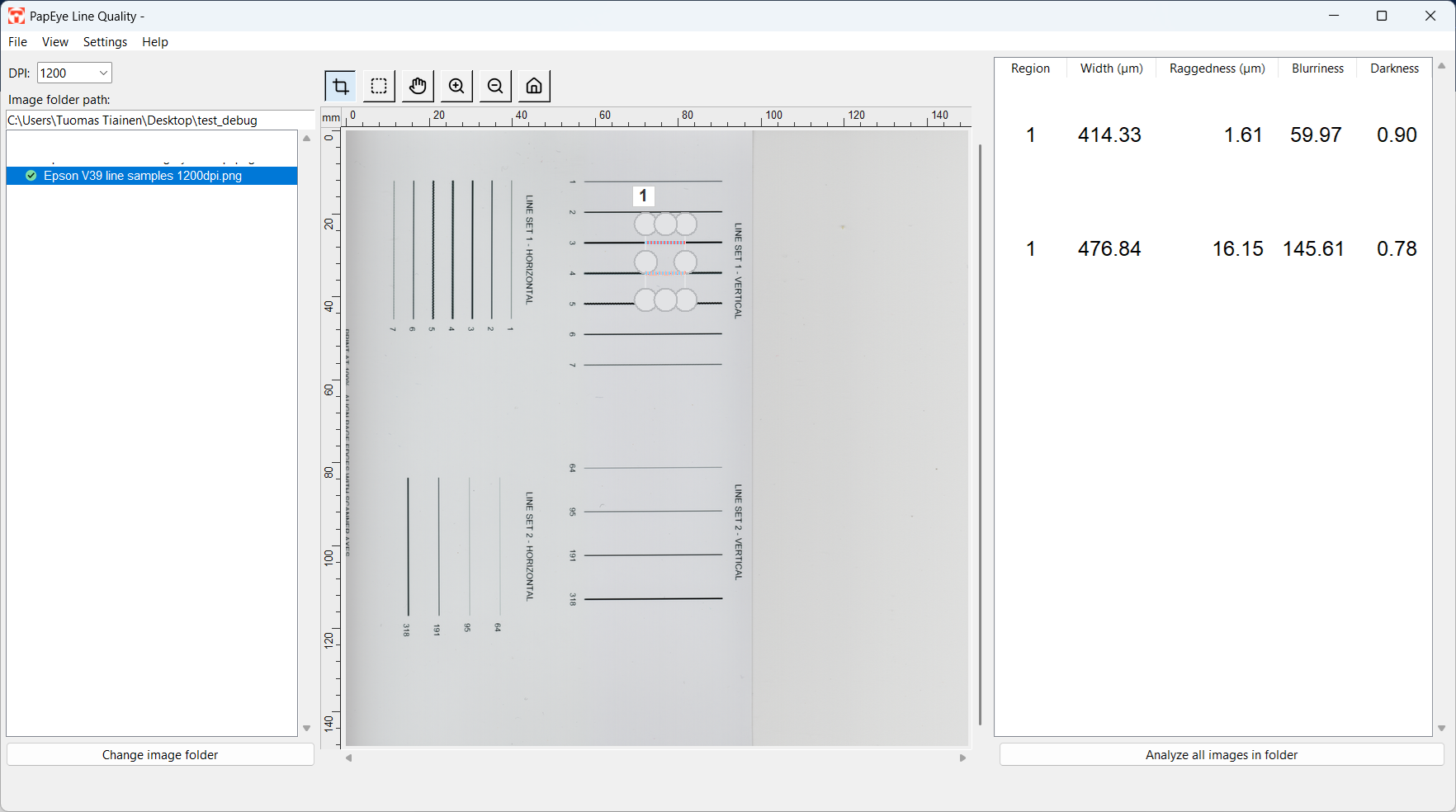
Line and character quality is usually judged visually under magnification. PapEye Line Quality gives paper, board and print professionals objective measurements of the same attributes, according to the ISO/IEC 24790 standard, from samples scanned with a standard flatbed scanner.
What it measures
Four attributes that together describe the dimensions, edge consistency, sharpness and darkness of printed lines and character strokes.
| Attribute | What it tells you |
|---|---|
| Line width | The edge-to-edge distance at the R40 reflectance threshold, in micrometres |
| Raggedness | How far each printed edge deviates from an ideal straight line, in micrometres |
| Blurriness | The width of the edge transition between the R70 and R10 boundaries, normalised by the line's optical density |
| Character darkness | The optical density inside the printed line, scaled by the square root of its width in millimetres |
How the analysis works
- 01
Scan
Scan the printed samples with a flatbed scanner. 1200 DPI is recommended; lower resolutions can be measured, but the result is flagged.
- 02
Analyze
Draw analysis regions across the lines. PapEye measures every line that crosses a region from top to bottom or from left to right, up to 50 lines per region, and reports a separate row of results for each.
- 03
Report
Check the measured boundaries drawn over the scan, then view, copy or export the results in CSV or Excel-compatible format. Batch processing analyses and exports whole folders of similar samples.
See exactly what was measured
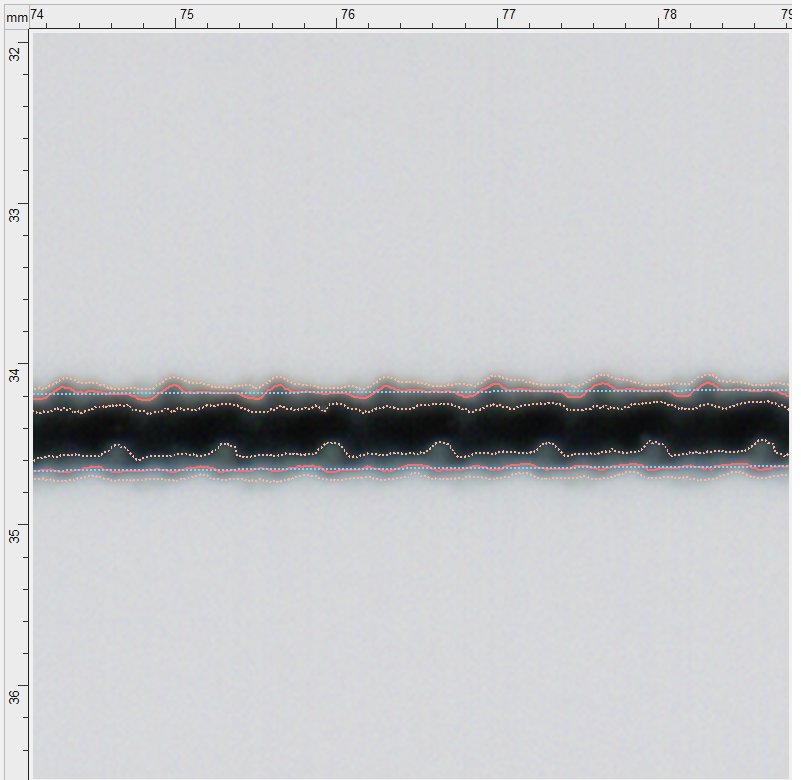
PapEye draws the measured boundaries directly over the scanned line, so you can verify that the software measured the intended edge and see how each value was produced.
The primary measured edge is shown at full strength and the boundaries defining its transition more lightly. The fitted straight line used for raggedness is dashed, because it is a calculated reference rather than a feature printed on the paper.
Scanner calibration
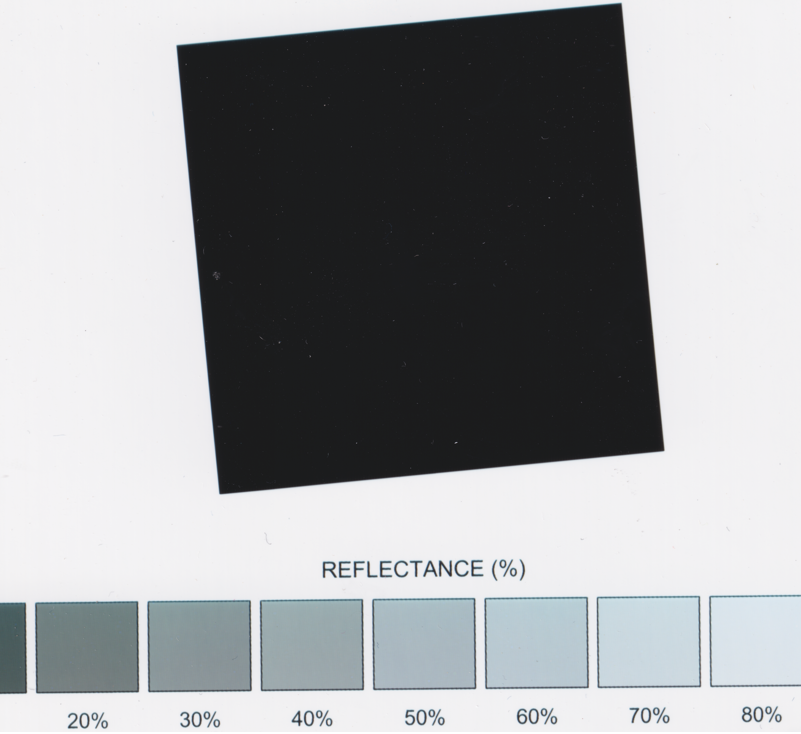
PapEye Line Quality calibrates the scanner from reference samples with two tools:
- Reflectance calibration (OECF) corrects the scanner's tonal response.
- MTF compensation measures and corrects the blur introduced by the scanner optics. Near-horizontal and near-vertical edges are calibrated separately, because a scanner can have different sharpness in its two scan directions.
Requirements and outputs
The scan and the measurement region must contain enough of the line and its background for the edges to be measured reliably. PapEye warns you when the recommended conditions are not met.
| Scan resolution | 1200 DPI recommended; lower resolutions are measured but flagged |
| Line length | At least 1 mm; 5 mm or more along the line recommended |
| Region across the line | Line width plus approximately 2 mm, leaving at least 1 mm of clean paper on each side |
| Line orientation | Within 30 degrees of vertical or horizontal |
| Lines per region | Up to 50 |
| Operating system | Windows, Linux |
| Application | Standalone executable with no conventional installation required |
| Scanner | Standard flatbed scanner; a list of recommended scanners is available from Tapio |
| Input formats | PNG, JPEG, GIF, BMP, TIFF and PDF |
| Result exports | CSV and Excel-compatible exports, result thumbnails and sample-region files |
| Batch processing | Analysis and export of entire folders containing similar samples |
| Command line | Available for automated and scripted analysis |
| Standard | Algorithms based on ISO/IEC 24790 |
Licensing and purchasing
PapEye Line Quality is sold as a permanent license for a single PC. Licenses are issued per PapEye product and per machine, and a license for one PapEye product does not unlock another.
- Request a demo or quote from us.
- On first run, PapEye displays a Machine ID. Send it to Tapio Measurement Technologies.
- Place the license file you receive in the
.papeyefolder in the user's home directory.
Frequently asked questions
Do I need scanner calibration?
Not necessarily. When you compare similar samples measured with the same scanner, resolution and settings, the scanner adds approximately the same optical blur to every measurement, so the results can still be used reliably for comparative analysis, sample ranking and process monitoring. To calibrate, scan a slanted-edge and greyscale target and use the calibration features in the PapEye Line Quality settings.
Why does a printed line produce no result?
The most common reasons: the line does not cross the complete selected region, stops inside it, is more than 30 degrees away from vertical or horizontal, or does not have enough clean paper beside it.
What scanner resolution should I use?
Depending on the accuracy you need, 1200 DPI or higher. Lower-resolution scans can also be measured.
Can PapEye measure characters as well as lines?
The attributes apply to sufficiently long, straight line segments, which is how ISO/IEC 24790 defines the measurement. To analyse a character, draw the region across a suitable straight stroke that crosses the complete region.
What is character darkness?
How solidly a printed line or character stroke is laid down. PapEye calculates the average optical density inside the line's R25 boundary and scales it by the square root of the line width in millimetres, which makes strokes of different widths more comparable.
Other PapEye applications
Measure line quality from scanned images
Measure line width, raggedness, blurriness and character darkness from standard flatbed scans. Ask us for a demonstration, discuss your measurement application or request a quote.