

PapEye software
Automated dirt speck analysis for pulp, paper and paperboard
Manual dirt counting is slow, subjective and difficult to repeat. PapEye Dirt Count detects, measures and documents visible dirt specks in scanned samples, and turns complete folders of images into one clear, repeatable result.
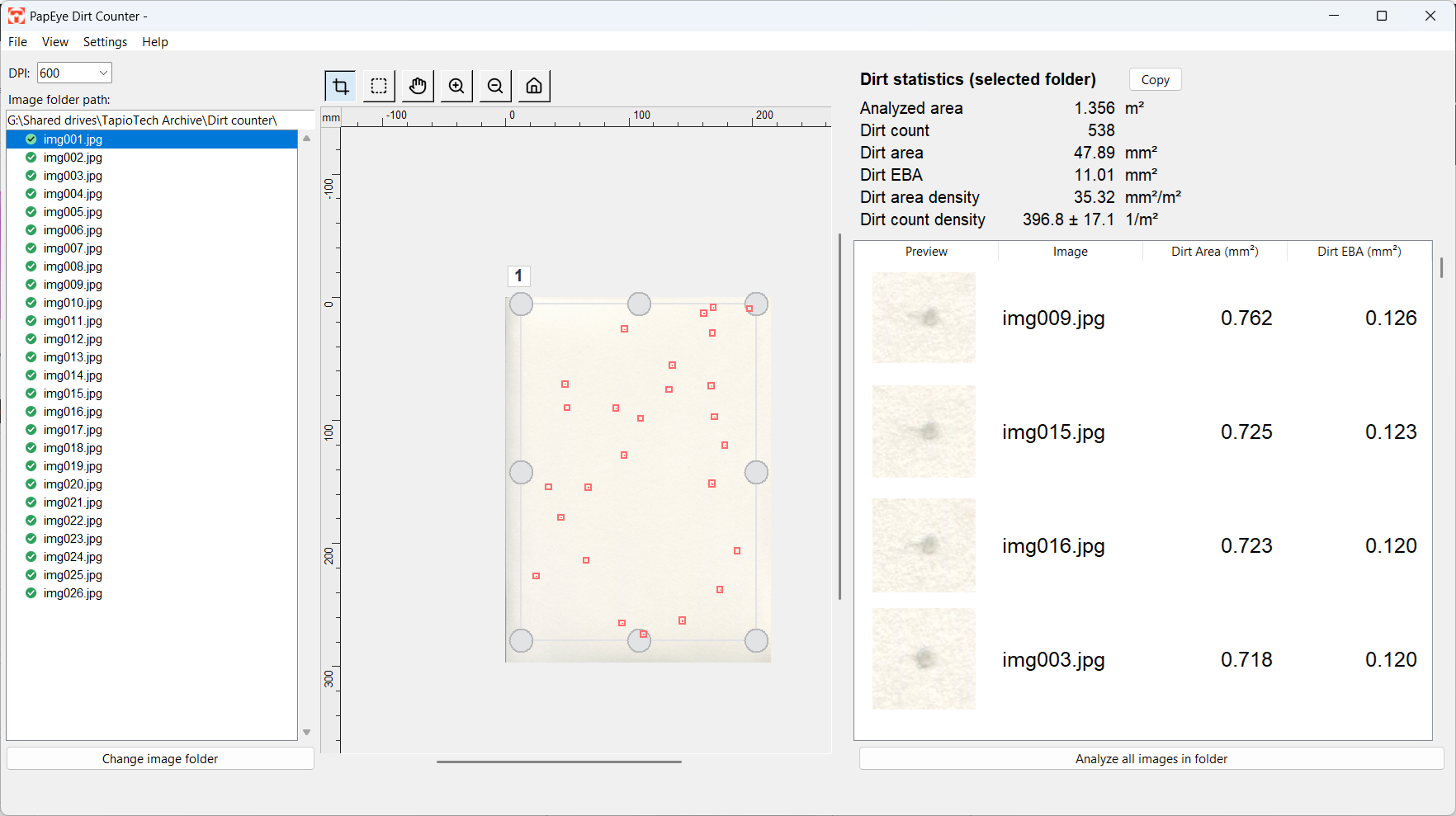
PapEye Dirt Count transforms ordinary scanner images into objective measurement data that is easy to review, compare and report. It finds contrasting dirt specks automatically, measures each detection, and combines the results from all images into one analysis, with a close-up of every speck so you can check what was counted.
What it measures
| Result | What it measures | Why it matters | Reported as |
|---|---|---|---|
| Dirt count | The number of accepted dirt specks within the analysed sample area | Shows how frequently visible contamination occurs and supports comparisons between samples | Total count and specks per m² |
| Physical dirt area | The measured surface area of each accepted dirt speck | Distinguishes samples with many small specks from those with fewer, larger defects | mm² per speck, total mm² and mm²/m² |
| Equivalent Black Area (EBA) | The visual impact of a speck, based on its size and contrast against the paper background | Distinguishes highly visible dark defects from lighter specks of the same physical size | EBA per speck and total EBA |
| Size distribution | How the detected specks are distributed across sizes | Shows whether changes come mainly from small particles or from larger defects | Histogram and detailed result list |
| Visual verification | Close-up thumbnails and measured outlines for every detected speck | Lets the operator verify detections and exclude folds, fibres or other unwanted findings | Reviewed list with thumbnails |
How the analysis works
- 01
Scan
Scan the pulp, paper or paperboard samples at a minimum resolution of 600 DPI. Use several images to reach a representative total sample area.
- 02
Analyze
Select the folder of scanned images and define the area to be measured. PapEye processes single images or all images as one batch.
- 03
Review and report
Inspect the detected specks using close-up thumbnails and measured outlines, and include or exclude individual detections where needed. Then view or export the detailed results and summary statistics.
Features
Automatic detection
Visible dirt specks are detected from scanned images, with the physical dirt area and Equivalent Black Area of each detection.
Adjustable settings
Size, contrast, shape and edge-threshold settings can be adjusted, and scanner calibration features are included.
Visual verification
Close-up thumbnails and measured outlines for every detection, with tools for including or excluding individual specks.
Save inspection time
Less time spent inspecting samples manually, and large sample areas analysed efficiently in one batch.
Compare samples
Compare production runs, suppliers and sample groups with consistent numerical results, summary statistics, densities and size-distribution histograms.
CSV export
Export the data to quality reports and further analysis.
Requirements and outputs
| Operating system | Windows, Linux |
| Application | Standalone application |
| Scanner | 600 DPI or higher; a list of recommended scanners is available from Tapio |
| Sample area | Large enough for a representative number of detections: about 100 specks give an uncertainty of ±10% |
| Input | Single images or complete image folders |
| Results | Dirt count, physical area, EBA, densities, size distributions and summary statistics |
| Export | CSV |
| Method | Developed in-house; does not directly correspond to a specific TAPPI or ISO dirt counting standard |
Licensing and purchasing
PapEye Dirt Count is sold as a permanent license for a single PC. Licenses are issued per PapEye product and per machine, so a license for another PapEye product does not unlock Dirt Count. Contact us for a demonstration, a sample analysis or a quote.
Frequently asked questions
What does PapEye Dirt Count measure?
It detects visible dirt specks and reports their physical area and Equivalent Black Area. It also calculates dirt counts, totals, densities, size distributions and summary statistics for the complete sample set.
What is Equivalent Black Area?
Equivalent Black Area, or EBA, describes the visual impact of a dirt speck by considering both its size and darkness. A lighter speck therefore has a smaller EBA than an equally sized black speck.
What is the measurement uncertainty?
Assuming the dirt specks are distributed randomly, scanning N specks gives an uncertainty of ±√N. About a hundred specks are needed for an uncertainty of ±10%. This statistical principle also sets the minimum feasible surface area for a low relative uncertainty.
How do I get a large enough surface area?
If the dirt level is low, scan a larger area: cut and scan several sheets and use the folder analysis to combine them.
Can the dirt specks be classified?
Yes. Specks can be included or excluded with the built-in selection tools. Go through the list and classify them by the close-up image, the dirt area or other properties.
Does the software produce false positives?
Detection is based on colour contrast against the paper background. As with all dirt counting methods, non-dirt defects such as dust, fibres or creases may occasionally be detected. The selection and cropping tools let you exclude them quickly.
What scanner resolution is required?
It depends on the size of the specks you need to resolve. 600 DPI is required for reliable detection; lower resolutions raise the minimum detectable speck size and may lead to underestimating small defects.
Does the software follow a TAPPI or ISO method?
No. The algorithm was developed in-house and does not directly correspond to a specific TAPPI or ISO dirt counting standard. It is intended for internal quality control, trend monitoring and comparative analysis with consistent sampling and imaging conditions. With the same scanning setup and settings, results are highly repeatable and suitable for routine laboratory use.
Other PapEye applications
Turn scanner images into dirt data you can act on
See how PapEye Dirt Count makes dirt speck analysis faster, clearer and easier to repeat. Ask us for a demonstration, a sample analysis or a quote.